Thursday, May 4, 2017

SSC Result 2017 From Your Android Mobile Phone

Hello Every one,

Bangladesh Government just Publish SSC/HSC result on the web.

From now you can get your result from your android mobile phone just a few touch away.

How to..

Click here to install the app to your android mobile


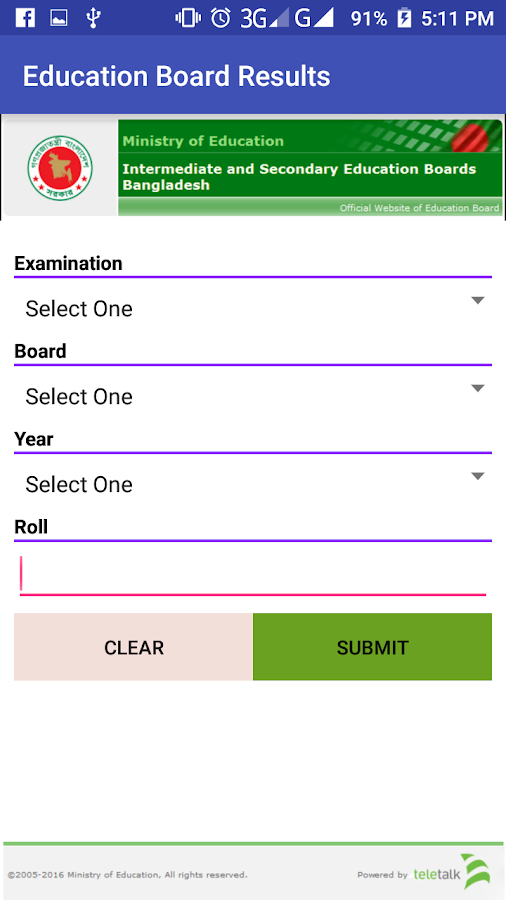
   BD Results (Official Apps)- screenshot

Friday, May 16, 2014

SSC AND HSC Result 2014 in Bangladesh


Hello Every one,

Bangladesh Government just Publish SSC/HSC result on the web.

From now you can get your result from here

http://www.educationboardresults.gov.bd/lite/index.php


http://www.educationboardresults.gov.bd/lite/index.php

Saturday, October 26, 2013

Wordpress Question and answer part-2

21. Who supports, maintains, and updates the WordPress core code available on WordPress.org?


Ans: The WordPress community


22. If you want to be allowed to access wp-admin/maint/ what do you need to do first?


Ans: Edit wp-config.php file and set WP_ALLOW_REPAIR to true


23. When we talk about "Post Tags" in WordPress what do we mean?


Ans: Keywords that classify concepts within the content


24. Which plugin doesn't come with WordPress by default?


Ans: Jetpack


Q. Which plugin come with WordPress by default?


Ans. Akismet
  • Hello Dolly
25. What constant can you set to control the number of post revisions WordPress keeps?

Ans: WP_POST_REVISIONS

26. WordPress displays in US English by default, but is capable of being used with

Ans: any language

27. All plugins in the WordPress.org repository are guaranteed to work.

Ans: False

28. An introduction to your full blog posts is called a(n):

Ans: Excerpt

29. What is bbPress?

Ans: A forums plugin for WordPress.

30. If a theme is not acting as anticipated, and you have just loaded a plugin, what should you do?

Ans: Upgrade the plugin or deactivate it

31. In what order does blog content appear on a WordPress blog by default?

Ans: Reverse chronological order

32. Which of the following is a good reason to delete the admin account?
Ans: To enhance security
33. This function allows quick publishing with a web browser bookmarklet. You can create a post by quoting some text, images, and videos on any web page.

Ans. Press This

34. These are provided in the Plugin API and enable your plugin to call functions at specific times during the loading of WP.

Ans. Hooks

35. What type of installation allows for multiple WordPress Sites/Blogs on one WordPress Installation?

Ans: Multisite

36. How can one determine the post format of the current post in the loop?

Ans: get_post_format

37. How do you schedule a post for later publishing?

Ans: Click "Edit" next to "Publish Immediately," select a time, then click OK. Then click "Schedule."

38. What are some indicators that a WordPress theme is “premium”?

Ans: Quality graphic design and easy customization

39. This is a simple set of functions for creating macro codes that let you embed options to install a contact form, blog archive index, images, videos, or audio

Ans: Shortcode API

40. When upgrading to a newer version of WordPress, you should check with your web host to ensure the following minimum required versions of these exist:

Ans: PHP and MySQL


Thursday, October 24, 2013

Wordpress question and answer part -1


1. What is the safest way to customize the look and functionality of your site without losing the changes on updates?

Ans: create a child theme with style.css and functions.php.

2. You can download WordPress at WordPress.com.

Ans: False

3. WordPress categories allow you to:

Ans: Easily designate items in your site that go together

4. At a very minimum, a WordPress Child Theme consists of which files?

Ans: style.css

5. To change the email address that is used for new user notification, which menu option should you go to?

Ans: Settings

6. Which function should a plugin use in order to echo a string to the browser and make it translatable?

Ans: _e('string', 'namespace');

7. Which template tag should you use to output the post title inside the loop?

Ans: the_title

8. Which of the following is a valid permalink format?

(a) /%year%/%postname%/
(b) /%postname%/
(c) /posts/%post_id%/
(d) /%year%/%monthnum%/%day%/%postname%/

Ans: All are valid

9. What does the "RPC" in name "XML-RPC" stand for? ("XML-RPC" is used by WordPress to connect to external resources such as a mobile WordPress application)

Ans: Remote Procedure Call

10. if ( have_posts() ) { while ( have_posts() ) { the_post(); } } This is best described as a(n):

Ans: WordPress posts loop

11. Which of the following is not a required file in a WordPress Theme?

Ans: sidebar.php

12. Which of the following files must be deleted after installing WordPress?

Ans: None of the above. No need to delete any files

13. Which wp-config.php constant defines the path for your content folder?

Ans: WP_CONTENT_DIR

14. There can only be one loop in a template.

Ans: False

15. How much can you charge for a plugin released to the Plugin Directory?

Ans: You can't charge for the plugin, but you can charge whatever you want for premium features.

16.

17. Which of these is not a core post type?

Ans: Events

Q. 17. Which is core post type?

Ans: .Post
  • Tag
  • Page
  • Attachment
18. In which table is a user's display_name stored?

Ans: wp_users

19. When registering a new post type if you set public => true, then your post type will be

Ans: All of these
  • visible publicly in the front-end.
  • visible in search results.
  • visible in the admin interface.
  • available for selection in navigation menus.
20. You can export and import your blog from which Dashboard section?
Ans: Tools


Thursday, July 4, 2013

How to use FTP for upload file in hosting server?


·  
For upload all kind of web (site/application) file in a web hosting server we need an ftp client. Here we use filezilla as an ftp client

Click Start > Filezilla client


Filezilla ftp client will be start within few moments


Enter FTP host name, user name, password and port (if necessary).
Then click Quickconnect button.


Checking all data you provide


After Checking all data you provide connection will be establish. In right side you will see the remote site areas folder (folder in Hosting server). Double click one of the folders to open
Public_html or www


Find the folder from Local site (from pc) which you want to upload. Select all file and drag all to the right side


All file will be start uploading, after successful transfer you see the total on the left bottom corner.   


If any files fail to transfer then you can see it from the fail transfer tab below. Then click right button a menu will appear. Click reset and requeue selected files

 
Then click the queue files tab below left corner. Select all file from queue click right button, a menu will appear, click process queue, then all rest of file will be upload.


Wednesday, January 30, 2013

How to get Teletalk 3G internet settings on your android phone?

Step 1:

Write  SET
and sent it to 738


Step 2:

In return you will get a configuration message .

S

 Step 3:

Save it using the password: 1234


Step 4:

Then click install.


Thursday, July 2, 2009

Is Ecommerce Right for Your Small Business?

This is the third lesson in our series "The Ecommerce Tutorial"

Is Ecommerce Right for Your Small Business?

Getting a solid handle on what's actually a quivering mass of Jell-o requires attention to a pair of practical issues about e-commerce: what it really is and who it's for. Only after considering these basics can you determine what your specific e-commerce strategy could or couldn't be, or should or shouldn't be. What follows is my attempt to break down the issues into five statements that I hope will guide your thinking.

1. In your business, e-commerce is a concept that is aligned with, if not directly related to, your presence on the Internet.
When the Internet was "new," which I define as the time it was opened to the general public as opposed to the academic or scientific world (before Al Gore invented it, right?), everyone "had to have the Internet" to be competitive, and heck, to keep their doors opened. A lot of flutter swirled around getting on the Internet and not nearly enough around what that meant.
During this new era, I counseled many a worried business owner about what to do. At that time, the Internet was thought to be a marketing tool-no more, no less. So my counsel went like this: "The Internet is just another way to share information. It's just another tool."
My message, then and now, is that the Internet can enable you to sell and deliver products to your customers. If it's the appropriate tool, then use it! If it isn't the appropriate tool, then don't use it.

2. E-commerce allows you to gather information from customers, while delivering a marketing-and-sales pitch through a Web site.
Although the information you gather concerns orders, you can also ask customers or clients questions about who they are, where they want products shipped and billed to, what method of shipping they would like you to use-indeed, just about any question you would like to ask! In addition, e-commerce could enable you to process credit card information on the Internet, as well as take "cyber cash" from customers.
As an information dispensing-and-gathering device, e-commerce becomes a catch-all for using the Internet to conduct business per se. It allows you not only to advertise, market, and sell, but also to keep track of accounts receivables and payables, provide technology support...you get the idea, all from a single source: your Web site.

3. E-commerce can be a fully integrated solution or a technical "front-end" to a business that otherwise isn't wired.
Once you look at an e-commerce solution, you will need to consider the flow of information from your Web site into your back-office operations. Do you want a customer pushing a button to enter data into your client database, send shipping instructions to a warehouse, charge a credit card, enter information into your accounting system, and, for that matter, deliver a cup of coffee to your desk as you sit reading your morning paper? It's up to you to decide how much or how little of the process you want to "go electronic."
Regardless of your approach-full integration, partial integration or no integration-you need to understand the process from start to finish before you proceed. If you don't understand the process up front, you run the risk of designing, redesigning, throwing out, starting over, and redesigning again, all of which is very, very expensive. The cost can range from less then $10 a month for a simple setup to hundreds of thousands a month, all of which is comparable to the difference between using Quicken versus an enterprise-wide accounting package.

4. The online world has as many e-commerce solutions that suit a specific need as The Body Shop has bath products. If you don't feel you have the data to sort through and choose the best solution, you're hardly alone!
You can lick this problem easily. Work with a knowledgeable person you trust to help you understand not just the technical issues of the e-commerce solution you're considering, but also the business issues. Examples of such professionals include consultants for the Internet, systems integrators, and technology-savvy marketing types.

5. E-commerce is not about technology-it's about your business. While it is tempting to think of your e-commerce solution as something "the geeks need to worry about," don't go there.
E-commerce is a part of how you run your business. It will take time to implement and should be seen as an investment. You should exercise the same care that you would use in choosing a 401K provider, suitable office space, your key personnel, or your enterprise-wide accounting package.
The e-commerce decision is one that you, the entrepreneur, have a choice in making. Do you want to conduct your day-to-day business online? If the answer is yes, then you need to work with sales, marketing, finance, tech support, customer service, information systems, network administration, support staff, and the receptionist to make sure you incorporate all pieces of a solution and inform all people about the purpose of the solution or if you dont have the time and money to hire and manage your own staff you can choose a do-it-yourself service that handles all of this for you. For more information about do-it-yourself tools please visit http://www.easystorecreator.com
Sunday, January 25, 2009

Choosing a Vendor To Process Your Online Transactions

This is the second lesson in our series "The Ecommerce Tutorial"

Choosing a Vendor To Process Your Online Transactions

To process online orders, you must offer online payment options. The most widely used form of payment currently is the credit card. Marketing studies show that you'll lose 60 percent to 80 percent of your potential orders if your Web site is not set up to accept credit cards; they also show that if you offer credit card payment, not only will you receive more orders, but those orders will be substantially larger.

Credit cards enable impulse buying, reassure customers of your legitimacy, and simplify your billing. Other methods of collecting payment are becoming available and include charging purchases to a phone bill, using electronic funds transfers (EFT), paying by electronic check and various forms of prepayment. Each of these methods requires payment processing either in the form of software added to your Web site or by linking to a payment processing service.

Understand Merchant Accounts and Their FeesTo accept credit cards, you must establish a merchant account, a special bank account for handling the revenue (and fees) from credit card transactions. Your merchant account provider (MAP)-a bank or other institution that processes online credit card transactions-will verify the credit card, process the transaction, and deposit the results into your account, usually within two to four days.

Evaluate Alternative Online Payment MethodsCredit cards still reign as the leading method of payment for online purchases, but other payment options are available. Your product and your customers' buying preferences will influence which payment methods you accept. In other countries, credit cards are not as pervasive, so you may want to consider offering alternatives for your international customers. Offering multiple payment options on your Web site, if you can afford it and maintain your profit margin, is a means to increase sales by increasing customer convenience and confidence. Many alternative methods are better suited to micro-payments, charges under $1, because the processing costs are often lower and credit card merchant-account fees don't apply.

Determine The Fee Structure That Maximizes Your Profit MarginNot every product sells the same way, and not every merchant account provider charges you the same way. Choose a provider that suits your business. Begin by considering the nature of the products you sell-are they large and expensive? Perhaps then you ought to seek a MAP that offers a higher flat-rate transaction fee and minimizes the discount rate, since even a hefty $1 transaction fee will be far lower than a 2.5 percent deduction from the charge. On the other hand, if you rely on small, high-volume sales, even a $0.30 transaction fee can erase your profits.

Specify Your Technical RequirementsDifferent MAPs require different "gateways" on your site. These gateways are the pieces of code that transmit your customers' orders to and from your bank's transaction authorizing agent. If you plan to manually process your orders, a secure Web form might be good enough to capture credit card information that you can process offline.

Evaluate Your Business's Credit-WorthinessMAPs, like most banks, pay close attention to the companies with which they do business. Such factors as your company's length of time in business, outstanding debt, debt payment history, goods and services offered and even your personal history (for new businesses) will affect the fees your company pays to process credit card transactions on the Net.

Find MAPs You Can Work WithMany merchant account providers refuse accounts to start-up firms or firms and individuals with bad credit histories. Some MAPs will not accept "high-risk" accounts, a term that usually encompasses adult sites, online casinos, and sites operated by firms outside the MAP's own nation. Others refuse to process any transactions that originate on the Internet-even from their own existing brick-and-mortar clients-or may require that you create a separate merchant account to process orders that are not taken face-to-face but are received by mail, phone, or via the Internet.

Compare Fees and Technical CapabilitiesOnce you've developed a list of merchant account providers who might offer you an account, you need to compare the different MAP offerings. Be certain to ask detailed questions about each MAP's technical requirements, and make sure your system can work with your MAP's gateways-the software that actually submits your customers' credit card information for payment authorization.

Minimize Credit Card ChargebacksDiscussion about consumer credit card protection for Internet purchases has become intense. But the fact is that U.S. federal law limits a consumer's liability for unauthorized charges to $50, whether the purchase was made face-to-face or on the Internet. No such protective legislation exists for merchants, however, and they bear the full cost of fraudulent charges as chargebacks from their banks. When a fraudulent credit card transaction takes place without the physical card being presented to the merchant, or funds are uncollectible for some other reason, merchants are charged the sale amount by the cardholder's bank. This is known in the industry as a chargeback. Merchants may also be asked to pay penalty fees in addition to the cost of the original charge. Though it has not been as hot a topic for e-tailers, credit card chargebacks pose a serious threat to profits. To reduce revenue losses due to credit card fraud, online businesses need to take steps to reduce the risk they take with every order received through their Web sites. Find out how credit card chargebacks occur and what you can do to protect yourself.

Secure All Your Transaction Data and Prevent FraudCredit card information is extremely sensitive, and plenty of villains are waiting to exploit any breach in your security. Additionally, online merchants are as susceptible to credit-card fraud as face-to-face retailers. Make sure your merchant account provider has addressed these issues.

Prepare for International Payment ProcessingMany payment processing and merchant account providers do not accommodate international commerce. If you plan to market your product globally, you may need to search specifically for an international provider.

For more information on merchant accounts and fees involved and the recommended plans please visit http://www.easymerchantservices.com for more information.

Sunday, January 4, 2009

Increase Your Knowledge of E-commerce Lesson-1

This is Lesson 1 of your 10 part course:


"The Ecommerce Tutorial"

Congratulations on choosing to increase your knowledge of ecommerce.

This is the first lesson in our series "The Ecommerce Tutorial"

You might think that the only reason to put your business online is to sell things but there are many other reasons why your business should go online.

1. To Establish A Online PresenceBy 2007, worldwide ecommerce revenues are expected to total $12.7 trillion dollars. No matter what your business is, you can't ignore 12.7 trillion dollars. To be a part of that community and show that you are interested in serving them, you need to be on the WWW for them. You know your competitors will.

2. To NetworkA lot of what passes for business is simply nothing more than making connections with other people. Every successfull business person knows, it's not what you know, it's who you know. Passing out your business card is part of every meeting and every person can tell more than one story of how a chance meeting turned into the big deal. Well, what if you could pass out your business card to thousands, maybe millions of potential clients and partners, saying this is what I do and if you are ever in need of my services, this is how you can reach me. You can, 24 hours a day, inexpensively and simply, on the WWW. If you move, or get a new number you still have your virtual location where people can find you.

3. To Make Information AvailableWhat are your hours? What do you do? How can someone contact you? What methods of payment do you take? Where are you located? What is today's special? Next week's promotion information? If you could keep your customer informed of every reason why they should do business with you, don't you think you could do more business? You can on the WWW.

4. To Serve CustomersMaking business information available is one of the most important ways to serve your customers. But if you look at serving the customer, you'll find even more ways to use WWW technology. Allow your customer to search for exactly what they want without hunting through the store, they can find colors, sizes and more without the help of a sales agent, its all right there at their fingertips. All this can be done, simply, quickly and inexpensively, on the WWW.

5. To Increase Public InterestYou won't get a national magazine to write up your local store opening, but you might get them to write up your Web Page address if it is something new and interesting. Even if Newsweek would write about your local store opening, you wouldn't benefit from someone in a distant city reading about it, unless of course, they were coming to your town sometime soon. With Web page information, anybody anywhere who can access the Web and hears about you is a potential visitor to your Web site and a potential customer for your information there.

6. To Sell ThingsMany people think that this is the number 1 thing to do with the World Wide Web, but here it is number six to make it clear you should consider selling things on the Internet and the World Wide Web after you have done all the things above and maybe even after doing quite a few more things from this list. Why? Well, the answer is complex but the best way to put it is, do you consider the telephone the best place to sell things? Probably not. You probably consider the telephone a tool that allows you to communicate with your customer, which in turn helps you sell things. Well, that's how we think you should consider the WWW. The technology is different, of course, but before people decide to become customers, they want to know about you, what you do and what you can do for them. Which you can do easily and inexpensively on the WWW. When you are ready to sell, make sure you have the best in current Web technology without paying so much that you won't make a profit until the next century. That's smart business.

7. To Release Time Sensitive InformationWhat if your materials need to be released at a certain time? A contest winner, a special promotion, the fall coupon. Now the information can be made available at midnight or any time you specify, with all related materials such as photographs, bios, etc. released at exactly the same time. Imagine the anticipation of "All materials will be made available on our Web site at 12:01 AM". The scoop goes to those that wait for the information to be posted, not the one who releases your information early.

8. To Make Samples AvailableWhat if your widget is great, but people would really love it if they could see it in action? The album is great but with no airplay, nobody knows that it sounds great? A picture is worth a thousand words, but you don't have the space for a thousand words? The WWW allows you to add sound, pictures and short movie files to your company's info if that will serve your potential customers. No brochure will do that. You could potentially send out samples but the cost to do that would be overwhelming for a small business.

9. To Reach a Highly Desirable DemographicThe demographic of the WWW user is probably the highest mass-market demographic available. Usually college-educated or being college educated, making a high salary or soon to make a high salary, it's no wonder that Wired magazine, the magazine of choice to the Internet community, has no problem getting Lexus and other high-end marketer's advertising. Even with the addition of the commercial online community, the demographic will remain high for many years to come.

10. To Answer Frequently Asked QuestionsWhoever answers the phones in your organization can tell you, their time is usually spent answering the same questions over and over again. These are the questions customers and potential customers want to know the answer to before they deal with you. Post them on a WWW page and you will have removed another barrier to doing business with you and free up some time for that harried phone operator or yourself.

11. To Open International MarketsYou may not be able to make sense of the mail, phone and regulation systems in all your potential international markets, but with a Web page, you can open up a dialogue with international markets as easily as with the company across the street. As a matter-of-fact, before you go onto the Web, you should decide how you want to handle the international business that will come your way, because your postings are certain to bring international opportunities your way, whether it is part of your plan or not. Another added benefit; if your company has offices overseas, they can access the home offices information for the price of a local phone call. Plus, you can find markets for your products that could never reach you before at a reasonable cost.

12. To Create A 24-Hour ServiceIf you've ever remembered too late or too early to call the opposite coast, you know the hassle. We're not all on the same schedule. Business is worldwide but your office hours aren't. Trying to reach Asia or Europe is even more frustrating. But Web pages serve the client, customer and partner 24 hours a day, seven days a week. No overtime either. It can customize information to match needs and collect important information that will put you ahead of the competition, even before they get into the office.

13. To Keep Updated Information Available QuicklySometimes, information changes before it gets off the press. Now you have a pile of expensive, worthless paper. Electronic publishing changes with your needs. No paper, no ink, no printer's bill. You can even attach your Web page to a database which customizes the page's output to a database you can change as many times in a day as you need. No printed piece can match that flexibility. Its an instant online full color catalog that is updated in real-time.

14. To Test Market New Services And ProductsTied into the reason above, we all know the cost of rolling out a new product. Advertising, advertising, advertising, PR and advertising. Expensive, expensive, expensive. Once you have been on the Web and know what to expect from those who are seeing your page, they are the least expensive market for you to reach. They will also let you know what they think of your product faster, easier and much less expensively than any other market you may reach. For the cost of a page or two of Web programming, you can have a crystal ball into where to position your product or service in the marketplace. Amazing.

15. To Reach A Specialized MarketSell fish tanks, art reproductions, flying lessons? You may think that the Internet is not a good place to be. Well, think again. The Internet isn't just computer geeks anymore. With the millions of the WWW users, even the most specifically defined interest group will be represented in large numbers. Since the Web has several very good search programs, your interest group will be able to find you, or your competitors.

16. To Serve Your Local MarketWe've talked about the power to serve the world with a Web page. How about your neighborhood? Wherever you are located there is probably enough local customers with Web access to make it worth your while to consider Web marketing. Some local restaurants even take reservations on the web or internet order! You can make the Web a cost-effective retail location no matter where your market is.

Thursday, August 14, 2008

Internet Marketing Tip #3

If you are trying to sell a product or service on the Internet,then you might be doing so through an affiliate program. Yousigned up as an affiliate (usually for free) and they gave you anaffiliate ID (user name or number). They may have even given youa basic marketing package which includes text ads, banner ads,and solo ads with a link to your affiliate sales page. All youhave to do is use these tools to get traffic to your affiliatesales page.

Well that sounds pretty easy, doesn't it? This process actuallyworks too, except that your probability of converting yourtraffic into sales is very, very, very low. In other words, youmay have to have thousands of people visit your affiliatesales page before you ever see your first sale. Now those aren'tvery good odds, are they?

Unfortunately, that is what most people do. They spend a lot oftime, effort, and money getting all of those people to thataffiliate sales page and then they finally make a sale and earn areferral fee or commission and they can never contact that customer again.

But there's an even better way to go about making affiliate sales.Don't advertise your affiliate program directly. You must use afour step process.

Four Step Process

1. First, you must provide something of value. The easiestvaluable thing that you can give away is information. Aninformative email course, special report, or ebook are all greatways to give away free information.

2. This step goes along with the initial step above. Don't giveaway your free information until you get an email address. Youmust capture the name and email address of your prospective salein order to be able to implement the next step.

3. If the information that you are providing is good and helpspeople, then you will earn some trust. If someone gives you some
information that saves you time, money, or effort; then you aregoing to closely read anything that they send you - as long asthe information is still valuable. This is why it is so importantthat you get that name and email address before you start givingaway your information. Now you can keep the information flowingthrough an occasional email to your prospect.

4. Finally, if you have been providing valuable information andearning trust from people, it is much more likely that they willbuy something that you recommend. This is especially true if youcan convince them that what you are recommending will help themand that it is worth their money. The easiest way to do this isto recommend something that you have actually purchased and useyourself. Just tell them how it helped you and why you think thatit was worth what you paid for it!

Source:- ,Lisa Royehttp://www.freewebhost.com$2.50/month web hostingP.S. Have you started collecting emails on your website yet?Don't let your visitors get away without snagging their emailaddress so that you can contact them in the future.Providing something of value to your site visitors over thelong term is the best way to develop a relationship with them.And the key to making money on the Internet is to have arelationship with your mailing list.The easiest way I've found to collect email addresses frommy visitors is to use autoresponder software.And the best software I've seen is here:http://www.DumpTheJob.com/autoresponder-fw15Check out the free demo!

Wednesday, July 30, 2008

Internet Marketing Tip (2)

Every Internet marketing guru will tell you that list buildingis the primary key to really making money on the net. But inorder to build your list…

You will need to have an autoresponder or use an autoresponderservice. This is not an optional item if you are truly seriousabout Internet Marketing. An autoresponder allows you to:

1. Put a form on your website that your visitors can use tosign-up for a newsletter, a free report or whatever you areoffering in order to capture that customer's email.

2. Automatically send follow-up offers by email to your list.You can set the number of days in between your email offers.Once your emails are loaded into your autoresponder, it does allthe work automatically.

3. Broadcast a special offer by email to everyone on your list.This is a separate function from the automatic emails sent on apredefined schedule.

You basically have two options in this area:

Option #1 - You can use an online autoresponder service. Of thedozens of emails we have signed up for from various onlinemarketers, the ones that use an online autoresponder servicetend to use Aweber.

There is certainly nothing wrong with using an onlineautoresponder service. However, you should be very aware of thecost involved. This sort of service can cost you $20 per month.

To put this in perspective, this is a very low price to pay tobe able build your list and automatically send your offers tocustomers who are on your email list. There is no installationinvolved and you can use the service almost immediately.

For more info:http://DumpTheJob.com/aw-fw8
Option #2 - You can use autoresponder software that is installedon your server that accomplishes the same function as the onlineautoresponder service.

The big advantage to having your own autoresponder softwareinstalled on your server is that you only pay a one time fee forthe software. Autoresponder software can cost anywhere from $20to several hundred dollars.

There are some downsides to having your own autorespondersoftware:

If you don't know how to install it, you might have to payextra for professional installation.

If you don't select the right autoresponder program in thebeginning, it may not have all the features you really need toset your email sales on autopilot.

If you choose a high end autoresponder program, they canhave so many features that they are difficult to use effectively.

I prefer having my own autoresponder software installed on ourservers. We have gone through a number of autorespondersoftware programs and the one we are using now is called MailPacks.

There are several reasons I really love this autorespondersoftware program!

Low cost - it's only $47.Installation is free (and quick too).

It is feature-rich, but really easy to use.

It has a built-in link tracker to help you track how many timeslinks in your emails are actually being clicked.

You get a ton of free bonuses, including a DHTML pop-up maker,the ebook "Million Dollar Emails" and a whole lot more!

This autoresponder software will easily handle up to 50,000emails - perfect for small to medium Internet businesses.

It has features that you won't find on more expensive autoresponderprograms, but it is super easy to use.

If you're not sure thisprogram is the right one for you, they have a demo of the
software so you can try it before you buy it.

For more info:http://DumpTheJob.com/autoresponder-fw8List building doesn't have to be difficult if you have the righttools!

Tuesday, July 22, 2008

Internet Marketing Tip (1)

I got some online marketing tips from Internet . So I would like to share with all who visit my blog.
I will try to publish Internet Marketing Tip continuously.
List Building - A Critical Factor To Internet Marketing Success.
Do you have a means to capture a visitor's email address on yourwebsite? If you don't...
You are missing out on a ton of sales.
Even if you are marketing affiliate programs, you must provide away to get your visitor's email address. Otherwise...
You aren't able to contact those visitors again. And the realmoney in an internet business is in following up with people. Youalready know they are interested in what you are selling. Not onlyhave they come to your website, but they've given you their emailaddress to be able to contact them in the future. The researchfigures say it takes 7 times of contacting a prospect before theybuy.
Capturing a visitor's email address can be a relatively simple affair,provided you have these key items in place:
1. An autoresponder that can collect the email addresses for you and allow you to contact individuals that sign-up automatically. With most autoresponders, you can set them to redirect to a sales page upon sign-up, increasing your chances of a sale.
2. Offer a free product or report of value to your visitor for signingup. I like to offer a web-based or PDF report that provides valuableinformation AND includes at least one affiliate link.
Granted, it takes a little research to put together a free report ofvalue. But the pay off can be significant in the development of your contact list.
In the next tip, I will talk about autoresponder programs you may wish to consider that will help you build your contact list.

tech Tips

Hello readers This is a new blog siye.
Here I am try to give u New tech tips
What I can do
or Know
Ok